This integration allows you to connect bots only to personal accounts—connecting to bot accounts on Telegram, WhatsApp, and MAX is not supported within the Wazzup integration. To connect to bot accounts, you must perform the integration directly according to the instructions in the Integrations section.
The integration is not intended for sending mass messages from personal WhatsApp and Telegram accounts connected to Wazzup. If you send mass messages, your messenger account will be blocked.
You can only avoid being blocked if the account is used to handle incoming conversations.
Detailed information about account blocking is available in the Wazzup documentation.
¶ Preparatory Steps
- Log in to your personal account.
- Create a bot script.
- Create a text bot.
- Log in to Wazzup. If you don’t have an account yet, sign up via our link and get a bonus on your Wazzup account.
- Connect Wazzup to the desired messenger. Detailed information on connection is available in the official Wazzup documentation.
¶ Chat Integration
¶ 1. Get the Wazzup token
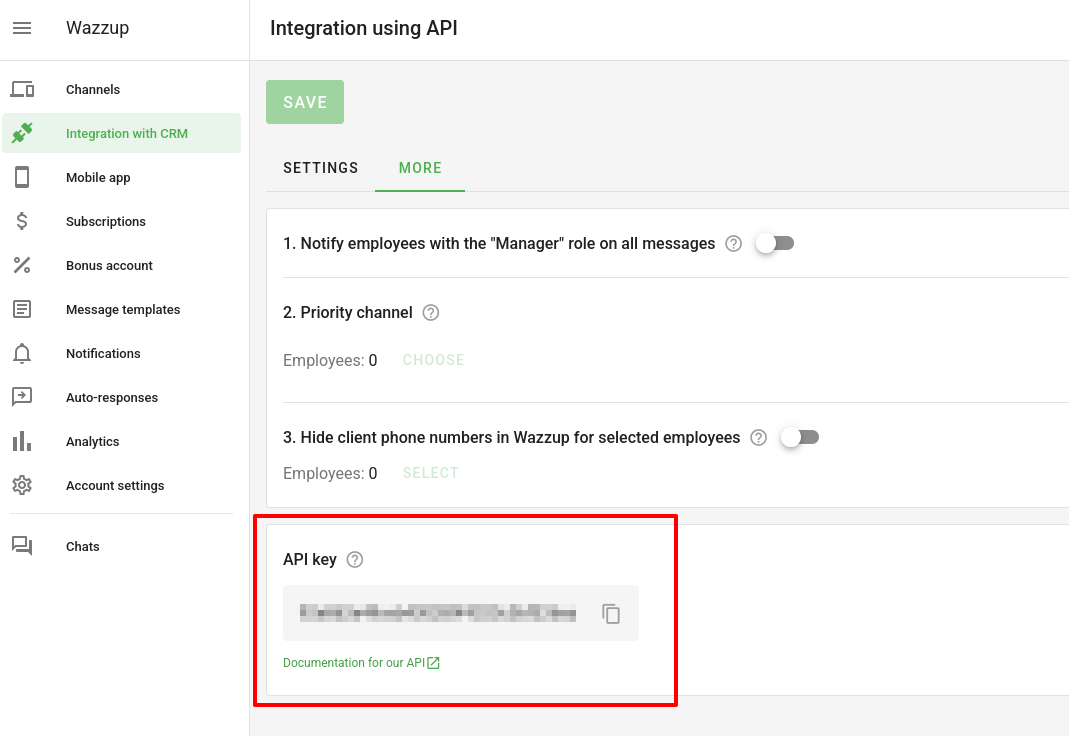
In your Wazzup account, go to the Integration with CRM -> Advanced section and copy the API Key.
¶ 2. Link the bot to a chat
When creating an integration, keep in mind that Wazzup supports only one API integration at a time. If an integration with another external system is already in place, it will stop working.
-
Go to the Text Bots section in your account.
-
Access the integration using one of the following methods:
- Directly: hover over the desired chat and click on
 → Integration.
 - From the chat edit screen: hover over the chat line and click on
 . Go to the Integration tab.
- Directly: hover over the desired chat and click on
-
On the Wazzup tab, paste the previously copied token into the Access Key (authToken) field.
-
Click the Select Channel button to choose the Wazzup messenger channel to which the bot will be connected.
-
Toggle the Use this integration switch. The bot will be linked and enabled.
Follow the steps in order: first paste the token, and only then click Use this integration—otherwise, the bot will not be connected.
- Go to the Integrations section of your personal account.
- Click on the Wazzup tile.
- Click Add Integration or
 in the top-left corner. A window for configuring integration settings will open.
 - Select the text bot from the dropdown list in the Chat Name field in the window that opens.
- On the Wazzup tab, paste the token you copied earlier into the Access Key (authToken) field.
- Click the Select Channel button to choose the Wazzup messenger channel to which the bot will be connected.
- Click the Save button. The bot will be linked and enabled.

¶ Disabling the integration
For more information on disabling the integration, see the article Disabling the integration.