To determine if a day is a working day for the company, you need to consider its work schedule and the days of the week it operates.
For example, a company might work from 8:00 AM to 8:00 PM and not work on Saturdays and Sundays. In this case, Saturday and Sunday would be non-working days for the company.
¶ Preparatory Steps
- Go to the Bots section of your personal account.
- Open the desired script in the editor. If you do not have a script, create a new one.
¶ Creating the Script
- Set the Result block with an action type of No Action.
- Create a time variable and assign it the value
{company.now|format: G}.
This action formats the system variable
{company.now}to get only the hour value without minutes and seconds. The obtained value will be stored in the new variable "time".
-
Swipe the arrow from the Settings box to the Result box.
-
Install the Condition box and follow the arrow from the Result box to the Condition box.
-
Install two blocks: Result and Information.
-
Write a message that the company is out of business in the Information block.
-
Draw an arrow with the output data type Default from the Condition block to the Information block.
-
Draw an arrow to the Result block from the Condition block.
-
Set the following parameters in the arrow:
- Exit type: AND condition.
- Conditions: Argument 1 -
{time}>= 8, Argument 2 -{time}< 20. - Variables: Key - time, Value -
{company.now|format: l}.
-
Install the second Condition block and draw an arrow to it from the second Result block.
-
Lead the arrow from the second Condition block to the Information block.
-
Set the following parameters in the arrow:
- Action type: OR condition.
- Conditions: Argument 1 -
{time}* Saturday, Argument 2 -{time}* Sunday.
- Install the second Information unit.
- Draw an arrow with the Default action type from the second Condition block to the second Information block.
- Write a message indicating that the company is operating in the second Information block.
- Save the script.
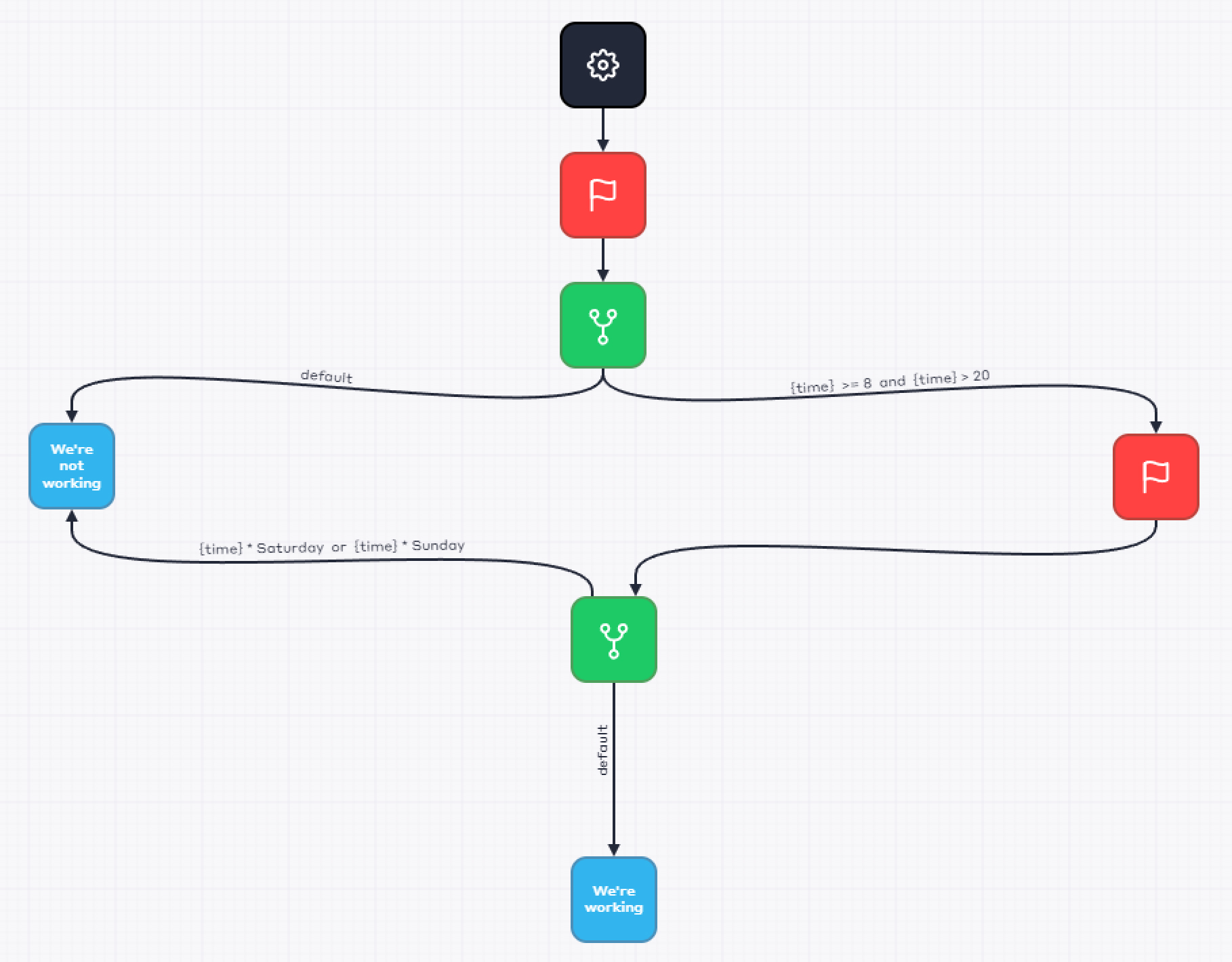
This script determines whether the current day is a working day for the company based on its schedule.
If the company operates from 8:00 AM to 8:00 PM and does not work on Saturdays and Sundays, this script will check the current day and time. If the current day is Saturday or Sunday or if the current time is outside the interval 8:00 AM – 8:00 PM, the script will inform that the company is not working.
The script can be adapted to any company's schedule by changing the conditions in the blocks.