¶ Customer data available
During the conversation, the robot accesses not only the data that the client reports, but also the data that is publicly available.
System variables are used to capture such data.
The table below shows what data can be accessed using system variables.
| Internal ID | Phone Number | Name | Nick | Type of сommunication | Channel | Messenger | External ID | Record | AccountID | ||
|---|---|---|---|---|---|---|---|---|---|---|---|
| Telegram | ✓ | —* | — | ✓ | ✓ | ✓ | ✓ | ✓ | ✓ | — | ✓ |
| ✓ | ✓ | — | — | ✓ | ✓ | ✓ | ✓ | ✓ | — | ✓ | |
| ✓ | — | — | ✓ | ✓ | ✓ | ✓ | ✓ | ✓ | — | ✓ | |
| Call | ✓ | ✓ | — | — | — | ✓ | — | — | ✓ | ✓ | — |
Where:
- Internal ID
{clientId}- client ID in the TWIN system. - Phone Number
{clientPhone}- the client's phone number. The{phone}variable is used for calls.
*There is no way to get the client's phone number directly in Telegram using a system variable. There is another way to get it, see the article Getting a client's phone number in Telegram for more details.
- Email
{clientEmail}is the customer's email address. - Name
{clientName}- the client's first and last name. - Nickname
{clientNickname}- the client's nickname. - CommunicationType
{communicationType}- the type of communication with the client. - Channel
{channelType}- the type of communication channel. - Messenger
{messenger}- the name of the messenger. - External ID
{clientExternalId}- client ID in the system.
For security reasons, use an encryption algorithm such as BASE64 for the
{clientExternalId}parameter. If the client ID is transmitted in the clear (without encryption), attackers can obtain it by analyzing the HTML code of the page. Using the client ID, attackers can not only gain access to the client's entire correspondence in the widget, but also correspond on the client's behalf. Using client ID in encrypted form provides reliable protection against unauthorized access to data and its misuse.
- Record
{recordPath}- audio recording of the current telephony dialog. - AccountID
{messengerUserId}- returns the identifier of the client's messenger account.
¶ Customizing data retrieval
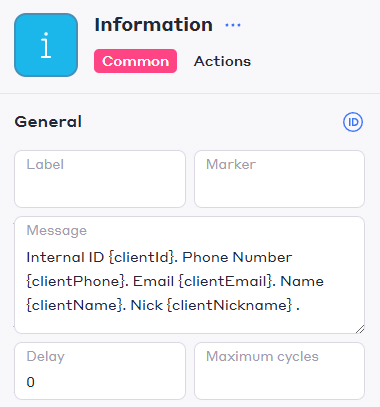
To retrieve customer data, specify the required system variables in the Message field of the Information block in the script editor. Once the script reaches the block with the variables, the bot will display their value.
In case it is not possible to obtain client data using system variables, for example, they are not publicly available, use a regular client survey with saving the answer to the prepared variables.
¶ What's next?
Read the full list of system variables.