If you need to use the same conditions in multiple arrows when creating a scenario, you can use importing conditions from a pre-made template to avoid manually writing out the conditions for each arrow.
The functionality is only available in arrows coming out of Condition blocks.
Before importing, prepare a CSV format file in UTF-8 encoding.
¶ File preparation
- Create a CSV format file in UTF-8 encoding.
- Open the created file.
- Enter variable names, conditions, and variable values into the file.
An example of a file content template:
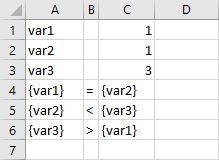
The template contains:
-
var1 1 - an example of a variable declaration, where var1 is the variable name and 1 is the value to be assigned to it if the condition is met.
-
var1 = var2 - an example of a condition declaration, where var1 and var2 are the names of the declared variables, and “=” is the condition by which the variables will be compared.
Variables that participate in the condition declaration are separated in the file by curly braces. Variables that are assigned a value do not need to be separated by curly braces.
The contents of the import file must not contain any line skips.
¶ Import a file into the arrow
- Go to the Bots section of personal account.
- Open the bot script.
- Select the arrow to which you will be importing.
- Select the desired condition type.
- Click on the file upload field.
- Select the file in the window that appears. The conditions and variables will be imported.
If the wrong file has been uploaded, upload a new file by clicking the upload file button again.