¶ Preparatory Steps
Create a new bot via BotFather in Telegram. For more information about creating a Telegram bot, see Create a bot in Telegram in Integrating Chat with Telegram.
Full integration of the bot with chat is not necessary, as the bot is only for receiving video IDs.
¶ Upload a file to the system
In order to upload a file to the TWIN system, you need to make an API request to add a file using any tool designed for sending API requests. For example, using Postman.
- Register with Postman and open it.
- Click on the Import button in the upper left corner.
- Paste the CURL of the request in the window that opens:
curl --location 'https://bot.twin-ai.com/api/v1/files'
--form 'private="false"' \
--form 'file[0]=@""'
The query will be automatically imported.
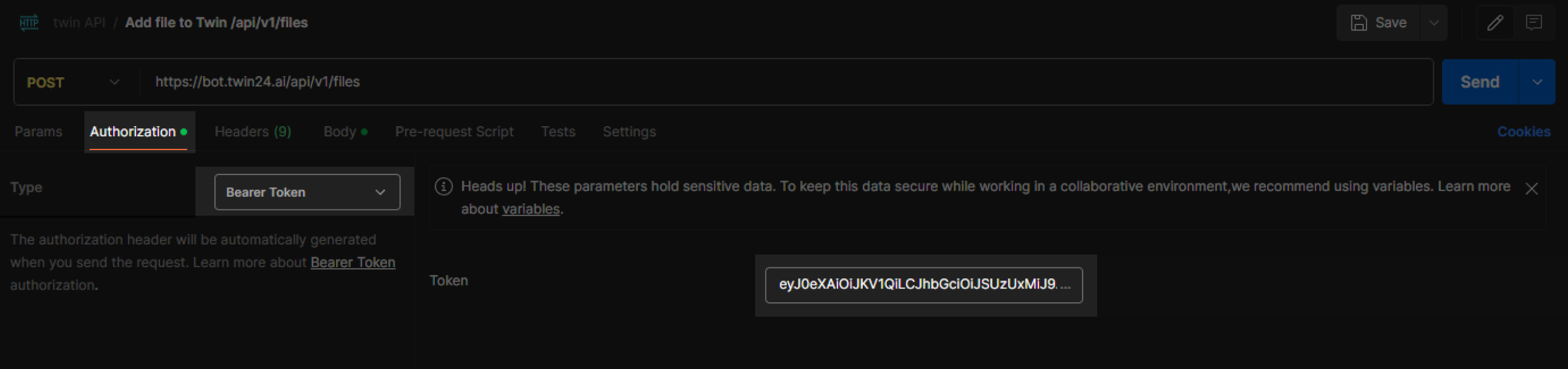
- Click the Authorization tab in the request parameters.
- Select the Bearer token authorization type in the Type field.
- Paste the TWIN authorization token into the Token field. You can copy the token from the profile settings in your personal cabinet - click on the account name and copy the API token from the opened window.
- Click the Body tab of the query parameters.
- Click on the Select file field to upload a file to it.
- Click on the Send button to send the request. The id field will be received in the server response - this is the ID of the file uploaded to the system.
- Copy this identifier - it is required to send the file from the script.
¶ Sending a file in a script
-
Go to the Bot Scripts section of personal account.
-
Open the desired script in the editor. If you don't have a script, create a new one.
-
Add a Result block at the location where you want the video file to be sent, and declare the following variables in it:
chat_id-{messengerUserId}.bot_token- Telegram bot token, which is displayed in BotFather after bot creation.file_id- file identifier in the TWIN system received earlier.
-
Set the Statement block, and draw an arrow to it from the Result block.
-
Click Open editor in the block parameters.
-
Paste the expression in the window that appears:
$response = http.request("https://api.telegram.org/bot" :: $bot_token :: "/sendVideoNote","POST").
header("Content-Type", "multipart/form-data").
body({"chat_id":$chat_id}).
file($file_id, "video_note").
send()

$code = $response.statusCode
$body = $response.body
- Click the Save button in the expression editor. This block is where the video is sent.
¶ Verify receipt of a video message
If the user has restricted receiving voice messages, the mugshot will not be sent as it is considered a voice message, unlike a regular video attached as a file.
- Add a Condition block after the Statement block where the video is sent.
- From the Condition block, draw an arrow going further down the script.
- Select the output data type in the Default arrow parameters.
- Swipe another arrow from the Condition block - it should go to the part of the script where some information will be sent instead of sending the video file. For example, this could be a Information block containing text or a picture.
- Select the type of output data in the AND arrow options.
- Add the
{code} = 400condition.
When using this structure, if video transmission is restricted, the contents of an additional Information block will be sent.