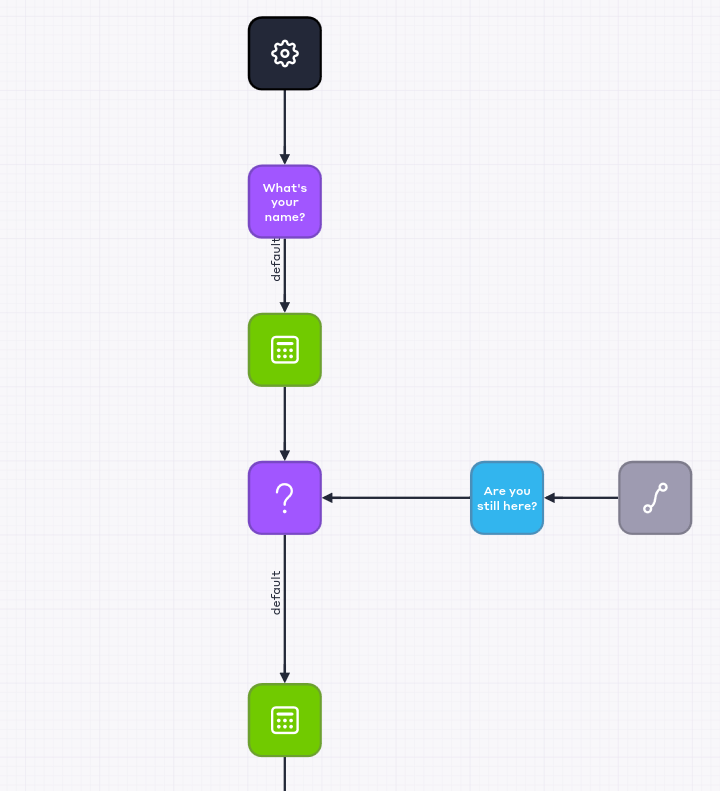
To have the bot send a reminder when the conversation partner has not answered a question within a given time, follow the steps:
- Go to the Bots section of personal account.
- Open the desired script in the editor. If you don't have a script, create a new one.
- Add the Information block and enter the question text in the Message field.
- Set up three blocks by connecting the blocks with arrows in sequence: Statement, Empty, and Question with no text inside.
- Set the Empty block and copy its ID. To do this, click on
 in the block properties.
 - Add a Information block and enter the text for the reminder in the Message field.
- Connect the blocks with the arrows: Empty → Information → Statement.
- Open the parameters of the Statement block from step 4.
- Click the Open editor button. The BPL expression input window will open.
- In the edit window that opens, enter the BPL expression:
$ti = timer.start(120, "block_id")
Where:
- 120 - time to wait for the interlocutor's reply, in seconds. Set the desired time.
- block_id - ID of the block copied in step 5.
- Press Save.
- Set the Statement block.
- Swipe an arrow of any appropriate type from the Question block to the Statement block.
- Click Open editor in the properties of the Statement block. This will open the BPL expression entry window.
- Enter the following BPL expression to stop the timer:
timer.stop($ti)
- Save the script. The fragment should look like this: