¶ Preparatory Steps
- Go to the Bots section of personal account.
- Create a new script or select from the previously created scripts.
¶ Script Setup
- Set the Question block.
- Enter the text Send any file in the Message field of the Question block.
- Set the Statement block.
- Click the Open editor button. The BPL expression input window will open.
- Enter the
$file = $file.get(0)expression in the window that opens. - Click Save.
- Swipe the arrow from the Question block to the Statement block.
- Set the output data type to File in the arrow parameters.
- Enter the name of the
filevariable in the Save answer parameter. - Set the Information block.
- Enter the text Got file in the Message field of the Information block.
- Set the Delay parameter to 5 in the Information block.
- Set the Request block.
- Click Open request editor.
- On the cURL tab, insert the following code:
curl 'https://twin-ai.com/iam/api/v1/auth/login'
-X 'POST'
-H 'Content-Type: application/json'
--data-raw '{"email":"{your_email}","password":"{your_password}"}'
-
Click the Request body tab in the Request block parameters.
-
Edit the field values:
email: specify as value the e-mail address used to log in to the personal account.password: specify as value the password from the personal cabinet.
-
Press Save.
-
Set the Empty block and draw the arrow from the previous Request block into it.
-
Set the output data type to Success in the arrow parameters.
-
Click Set up variables in the arrow in the Variables field.
-
Specify the name of the
tokenvariable and assign it the valuebody.token. -
Click Save.
-
Set up another Request block.
-
Click Open request editor in the block in the Request field.
-
On the cURL tab, paste the following code:
curl 'https://twin-ai.com/bot/api/v1/files/{file}/data'
-X 'GET'
-H 'Authorization: BEARER {token}'
- Press Save.
- Set the Information block.
- Click Set up variables in the block in the Variables field.
- Specify the name of the
linkvariable. - Click Save.
- Swipe the arrow to the Information block from the previous Request block.
- Set the Success output data type in the arrow parameters.
- Click Set up variables in the arrow in the Variables field.
- Specify the name of the
linkvariable and assign it the valuebody.url. - Click Save.
- Save the script and test the bot's performance. You should be able to:
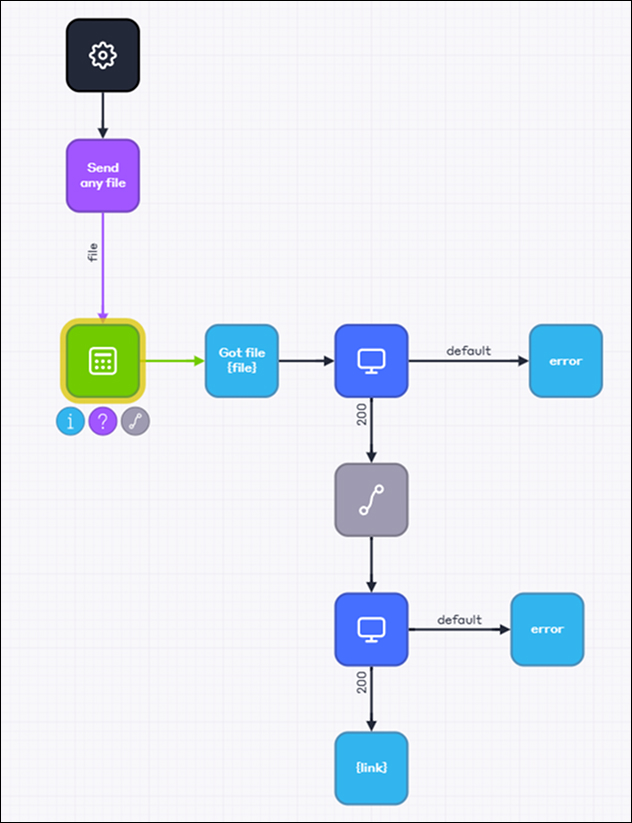
As the last message, the bot will send a link to the file sent to it by the user in this dialog. The link to the file will be saved in the link variable.